Better Than OpusClip for Making Shorts? 5 Picks for 2026

Eric Lee
CEO and Founder of Ssemble
Yes. For most creators who turn long videos into Shorts every week, Ssemble is a better choice than OpusClip because it charges per video instead of per minute, so a 60-minute video costs about $0.60 on Ssemble Pro (yearly) versus about $2.90 of OpusClip Pro minutes. Ssemble also includes caption translation into 50+ languages, a Game mode split screen for streamers, and Channel Automation that clips new YouTube uploads on its own. Other strong picks depend on your need: Vizard for free testing and API access on every tier, Klap for 99+ caption languages and auto-posting on all plans, and Submagic for caption-first editing.
TL;DR: "Better than OpusClip" mostly means better value per Short. Ssemble wins on cost for long videos (1 credit = 1 video up to 20 minutes, from $6/mo yearly) and on automation (auto-posting, Channel Automation, API from Pro). OpusClip still makes sense if you want a free plan to test (watermarked). Ssemble has no free plan and no prompt-based moment search.
What "better" means for Shorts
OpusClip is the best-known AI clipper, and its results are solid. When people ask whether anything is better, they usually mean one of four things:
- Cheaper per video. OpusClip charges 1 credit per minute of source video. Long podcasts and streams burn through credits fast.
- Less manual work. Clipping, captioning and posting without opening the app every day.
- Better fit for a format. Gaming streams, sports, or multilingual audiences.
- No watermark without a big bill.
Here is how the main options compare on those points.
Comparison table (November 2026)
| Ssemble | OpusClip | Vizard | Klap | Submagic | |
|---|---|---|---|---|---|
| Lowest paid | $15/mo or $6/mo yearly | Starter $15/mo (monthly only) | $29/mo or $14.50/mo yearly | $29/mo or $14.50/mo yearly | $19/mo or $12/mo yearly |
| Included | 30 credits (1 = 1 video up to 20 min) | 150 credits (1 = 1 min) | 600 credits | 100 output clips | 45 credits (~5 long videos) |
| Free plan | No | 60 credits, watermark | 60 credits, watermark, 720p | 1 trial video | No (trial) |
| Auto-post | Yes (TikTok, Shorts, Reels, X) | From Starter | 1 account free, scheduling on Creator | All plans | From Pro |
| API | From Pro, plus MCP server | Limited on Pro, full on Business | All tiers (rate-limited) | Pay-as-you-go | Business |
| Caption languages | 50+ | 20+ | Not stated | 99+ | 118 |
1. Ssemble: best overall OpusClip alternative for Shorts
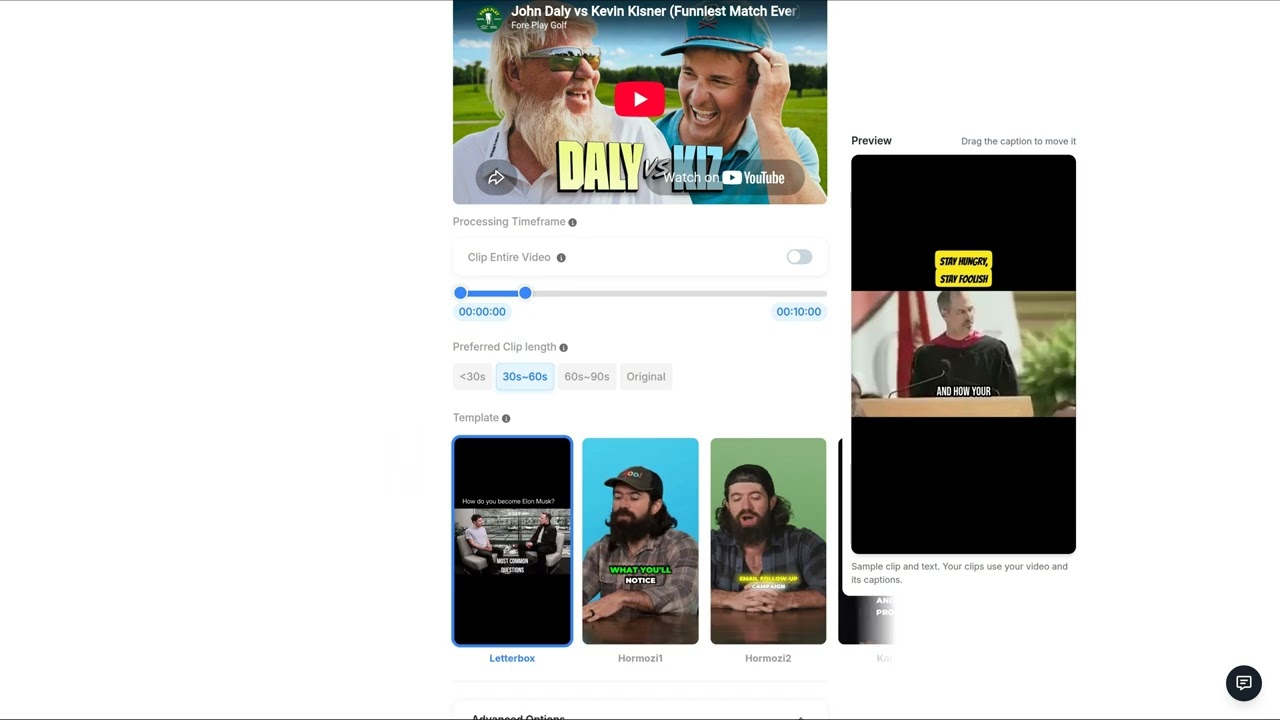
Ssemble is an AI clip maker used by 3.4M+ creators. Paste a YouTube, Twitch (VOD), Kick or Vimeo link, or upload a file, and it finds the most engaging moments, reframes them to 9:16 with face tracking, and adds animated captions.
Where it beats OpusClip:
- Cost per long video. 1 credit = 1 source video up to 20 minutes. A one-hour video is 3 credits. On OpusClip it is 60 credits.
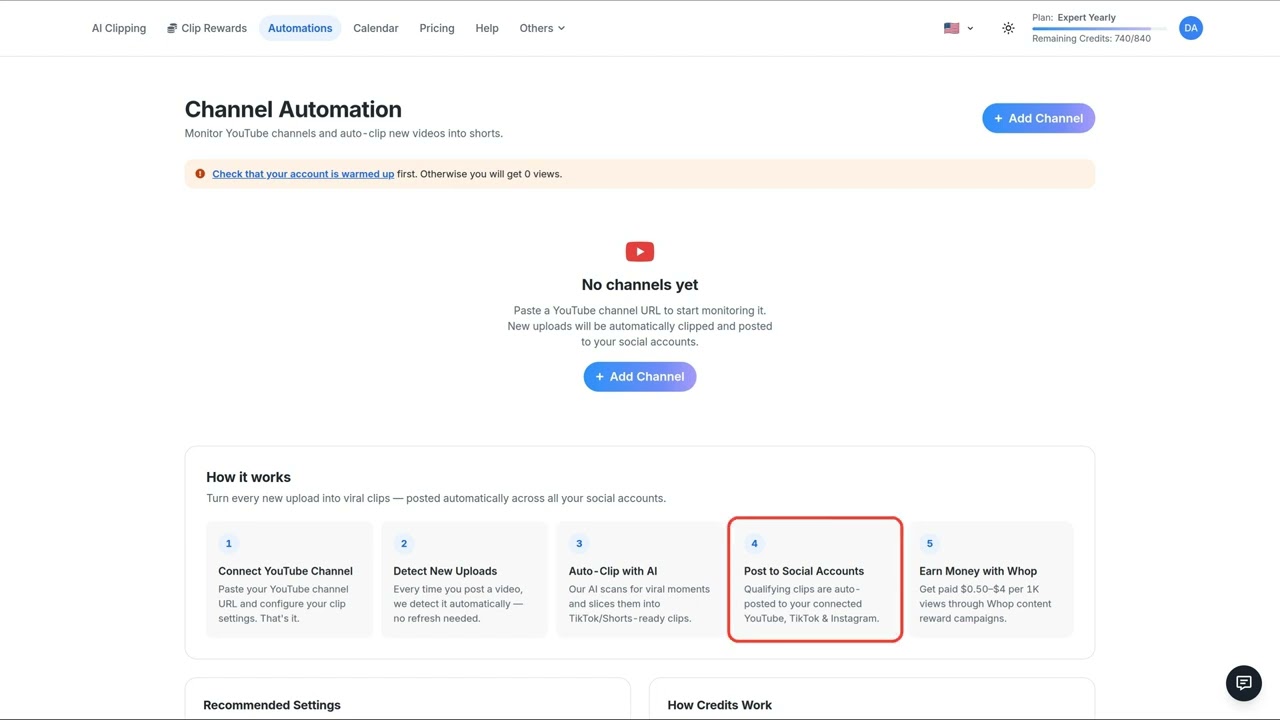
- Channel Automation (paid plans). Paste a YouTube channel URL and every new upload after setup is clipped and posted on a schedule, up to 21 clips per week per automation. Live streams are processed after they end. It does not backfill old videos.
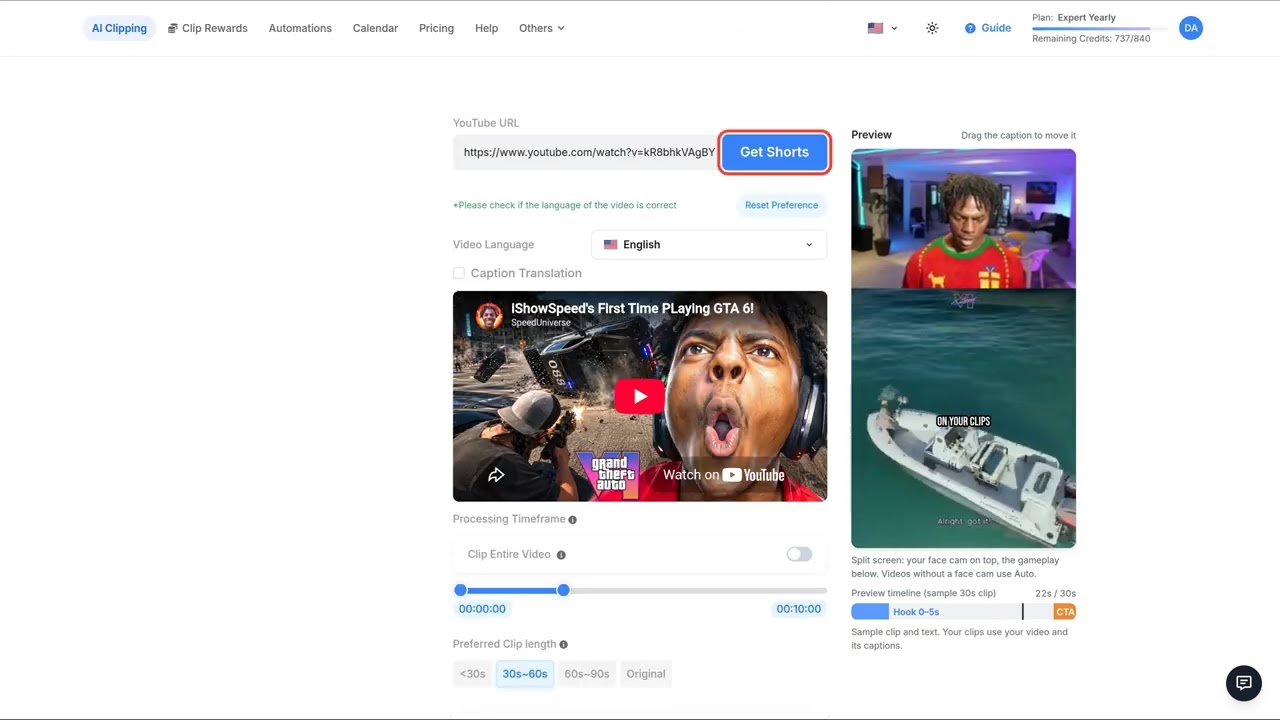
- Game mode. Face cam on top, gameplay below, built for Twitch and Kick clippers.
- Sports mode, which changes how moments are picked and framed.
- Caption translation into 50+ languages with the original audio kept.
- Retention extras: B-roll, transitions, sound effects, zoom, hook title, CTA overlay, music, logo overlay, and looping "game video" footage under the clip.
- API from Pro and an MCP server if you want to script your pipeline.
Where OpusClip may still win:
- Free plan. OpusClip lets you test with 60 free credits (watermarked). Ssemble has no free plan or trial.
- No prompt search in Ssemble. You cannot search for a moment by typing a topic. You can only set the processing timeframe and video type, so if prompt search matters, compare that feature directly.
2. Vizard: best for testing before you pay
Vizard's free plan (60 credits, 720p, watermark) and one free connected social account make it easy to try. Creator costs $29/month or $14.50/month billed yearly for 600 credits, and it offers API access on all tiers with rate limits. Pick it if you want an API on a lower tier and are fine with its credit model. Our Vizard vs OpusClip vs Ssemble comparison goes deeper.
3. Klap: best for many caption languages
Klap supports 99+ caption languages and auto-posting on all plans. Basic is $29/month or $14.50/month yearly for 100 output clips, and its API is pay-as-you-go at $0.44 per input video. It counts output clips, so it is predictable if you keep a fixed number of clips per video.
4. Submagic: best for caption-heavy edits
Submagic is known for captions and supports 118 caption languages. Starter is $19/month or $12/month yearly for 45 credits, which it describes as about 5 long videos. There is no free plan (trial only), and auto-posting starts on Pro.
5. Descript: best if you want to edit by hand
Descript is a full text-based video editor. It is a better fit when you want to control every cut rather than let AI pick clips. Paid plans start at $24/month or $16/month yearly with 600 minutes; the free tier gives 60 minutes at 720p.
Cost example: a weekly 90-minute podcast
Four 90-minute episodes a month is 360 minutes of source video.
- Ssemble Pro (yearly, $6/mo): each 90-minute episode is 5 credits (20 minutes per credit), so 4 × 5 = 20 credits. That fits inside 30 credits, with room for 10 more short videos.
- OpusClip Starter ($15/mo): 150 minutes covers one 90-minute episode, not four.
- OpusClip Pro (yearly, $14.50/mo): 300 minutes covers three episodes, not four.
At this volume Ssemble costs less than half of OpusClip Pro and still has credits left over. See the Ssemble pricing page for Expert (70 credits) and Business (150 credits).
How to make Shorts in Ssemble
- Go to ssemble.com and pick a plan.
- Paste a YouTube, Twitch, Kick or Vimeo URL, or upload an MP4, MOV or WebM file.
- Choose the video type: default (talking), Sports, or Game for split screen.
- Set a preferred clip length: under 30s, 30–60s, or 60–90s.
- Choose a caption template and language, then add extras like hook title, B-roll or music.
- Generate, then review clips and tweak captions, trims or crop in the editor.
- Schedule to YouTube Shorts, TikTok, Instagram Reels or X, or turn on Channel Automation so future uploads are handled for you.
When to pick something else
- You want to try for free first: OpusClip or Vizard free plans (watermarked).
- You need to type a prompt to find a specific moment: Ssemble does not do this.
- You need AI avatars, text-to-video or AI dubbing: Ssemble does not do these. Look at tools like HeyGen or InVideo.
- You want a manual editor more than an auto-clipper: Descript or CapCut.
Frequently Asked Questions
Is there anything better than OpusClip for making Shorts?
For regular creators clipping long videos, Ssemble is usually the better value: it charges 1 credit per video up to 20 minutes (from $6/month billed yearly) instead of per minute, adds caption translation into 50+ languages, Game mode, and Channel Automation. OpusClip is still a good pick if you want a free plan to test.
Is Ssemble cheaper than OpusClip?
For videos longer than a few minutes, yes. A 60-minute video costs about $0.60 on Ssemble Pro billed yearly (3 credits) and about $2.90 on OpusClip Pro billed yearly (60 of its 300 monthly minutes).
Does Ssemble have a free plan like OpusClip?
No. Ssemble is paid only, starting at $6/month billed yearly or $15 monthly, with no watermark. OpusClip's free plan gives 60 credits with a watermark and 3-day exports.
Which OpusClip alternative is best for gaming Shorts?
Ssemble's Game mode builds a split screen with the face cam on top and gameplay below, and it accepts Twitch VODs and Kick links directly. Live streams added through Channel Automation are processed after they end.
Can Ssemble post Shorts automatically?
Yes. You can schedule and auto-post to YouTube Shorts, TikTok, Instagram Reels and X, and Channel Automation can clip and post every new upload from a YouTube channel, up to 21 clips per week per automation.
Make more Shorts for less
1 credit = 1 video up to 20 minutes. Captions in 50+ languages, Game mode, auto-posting. From $6/mo billed yearly.
Try Ssemble →
📚 Related Guides
Prices checked November 24, 2026 on each tool's official pricing page. Pricing and features may change.
Ready to Start Clipping?
Transform long videos into engaging short-form clips with Ssemble's AI-powered tools.
Get Started
