What AI Tool Do Clippers Use for YouTube Shorts? (2026)

Eric Lee
CEO and Founder of Ssemble
Clippers, the people paid per view to turn streamers' and creators' long videos into Shorts, mostly use an AI clip maker to make the first cut and then post at volume. In 2026 the common picks are Ssemble, OpusClip, Vizard and Klap; Ssemble is the strongest fit for clippers because it takes Twitch, Kick and YouTube links directly, has a Game mode split screen for streamers, auto-posts to YouTube Shorts, TikTok and Instagram Reels, and costs about $0.60 per 60-minute video on the Pro yearly plan. Many clippers then polish their best clips by hand in CapCut or Premiere Pro.
TL;DR: Clippers need three things: cheap processing of very long videos, layouts that work for streamers, and fast posting. Ssemble covers all three (per-video credits, Game mode, scheduling and auto-post) and also runs Clip Rewards, a marketplace where brands and streamers pay clippers per view. OpusClip and Vizard are good if you need a free tier to start; Klap includes auto-post on every plan. Ssemble has no free plan.
What a clipper actually needs from an AI tool
Clipping is a volume business. A clipper might cut several streams or podcasts a day and post across multiple accounts. That changes what matters in a tool:
- Cost on long sources. Streams run for hours. A tool that charges per minute of source video gets expensive fast.
- Source support. Clippers work from Twitch VODs, Kick, YouTube and Vimeo, not just uploaded files.
- Streamer layouts. A face cam plus gameplay does not fit a simple 9:16 crop.
- Captions that hold attention. Most Shorts are watched without sound at first.
- Posting at scale. Scheduling across TikTok, YouTube Shorts and Instagram Reels, ideally from the same place.
Comparison: AI tools clippers use in 2026
| Tool | Stream sources | Streamer layout | Lowest paid plan | How usage is counted | Free option | Auto-post | API |
|---|---|---|---|---|---|---|---|
| Ssemble | YouTube, Kick, Twitch VOD, Vimeo, file upload | ✅ Game mode (face cam top, gameplay bottom) | $15/mo or $6/mo yearly | 1 credit = 1 video up to 20 min | ❌ | ✅ TikTok, YouTube Shorts, Instagram Reels, X | ✅ from Pro, plus MCP server |
| OpusClip | Not covered here | Not covered here | Starter $15/mo (monthly only) | 1 credit = 1 min | ✅ 60 credits, watermark | ✅ from Starter | Limited on Pro, full on Business |
| Vizard | Not covered here | Not covered here | Creator $29/mo or $14.50/mo yearly | 600 credits/mo | ✅ 60 credits, watermark, 720p | Scheduling on Creator | ✅ all tiers (rate-limited) |
| Klap | Not covered here | Not covered here | Basic $29/mo or $14.50/mo yearly | 100 output clips | 1 trial video | ✅ all plans | Pay-as-you-go |
| CapCut | Manual | Manual | Not covered here | — | — | ❌ | ❌ |
Prices checked November 24, 2026, on each tool's official pricing page. Eklipse and StreamLadder are also known among stream clippers for gaming highlights and vertical stream layouts.
Why many clippers use Ssemble
Per-video pricing suits long streams. One credit covers a source video up to 20 minutes, so a 60-minute podcast is 3 credits. On Pro billed yearly ($6/month, 30 credits) that is about $0.60 per hour of footage. For multi-hour streams you can also choose a processing timeframe so you only spend credits on the part you want.
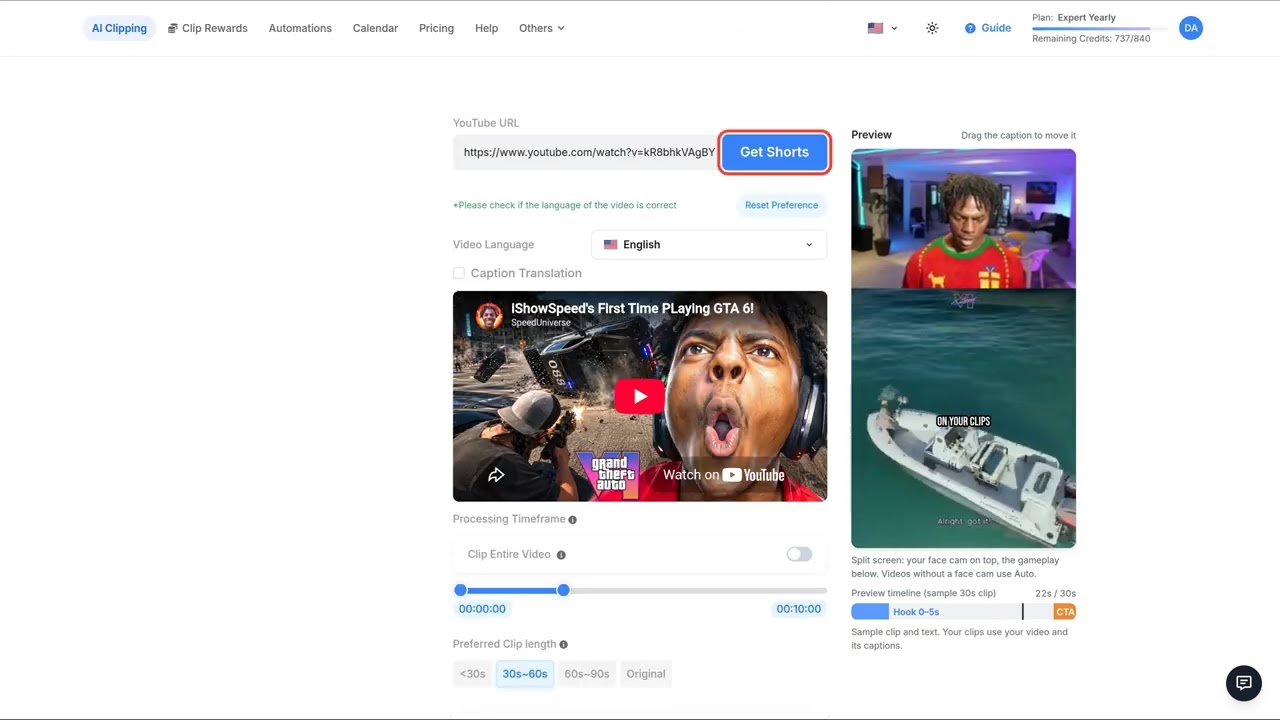
Game mode for streamers. Choosing the Game video type gives a split screen with the face cam on top and gameplay below, so you keep the streamer's reaction and the play.
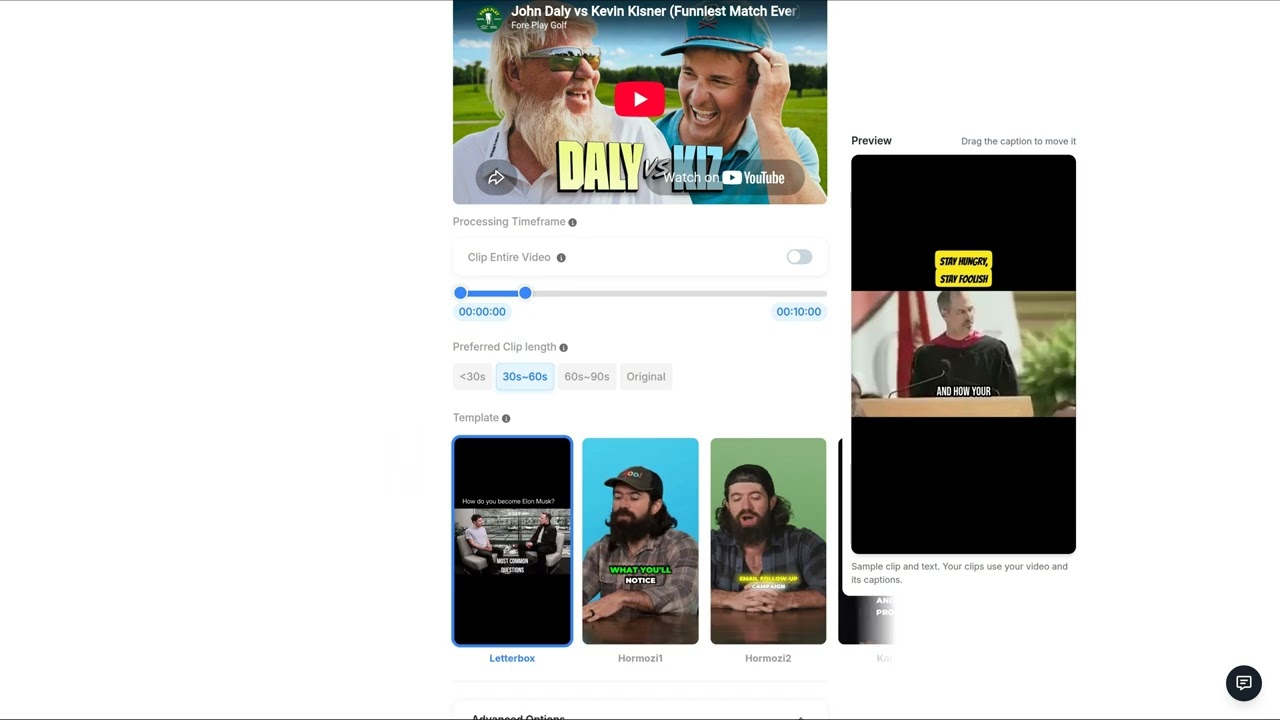
Captions and retention extras. Animated caption templates (such as Letterbox and Hormozi-style), hook titles, sound effects, zoom, B-roll, and a "game video" option that loops footage under the clip for retention.
Posting at volume. Schedule and auto-post to TikTok, YouTube Shorts, Instagram Reels and X from a calendar. Expert includes 3 social accounts and Business unlimited accounts.
Automation. Channel Automation (paid plans) clips and posts every new upload from a YouTube channel after setup, up to 21 clips a week per automation; live streams are processed after they end. The API (from Pro) and MCP server let you build your own pipeline.
Where clippers find paid work: Clip Rewards
Clip Rewards is Ssemble's clipping marketplace: brands and streamers fund campaigns and pay clippers per view of the clips they post. If you are new to clipping, our guides on how to make money clipping and the best clipping platforms explain how these campaigns work and how they compare.
How to make YouTube Shorts from a long stream in Ssemble
- Go to ssemble.com and pick a plan (from $6/month billed yearly).
- Paste the Twitch VOD, Kick, YouTube or Vimeo link.
- Set a processing timeframe if you only want part of the stream.
- Choose the video type: Game for gameplay with a face cam, default for just chatting or podcasts, Sports for sports content.
- Pick a clip length (under 30s, 30–60s or 60–90s) and a caption template.
- Add extras if you want: hook title, sound effects, zoom, CTA overlay.
- Review and fix clips in the editor (trim, reframe, word-by-word captions).
- Schedule to YouTube Shorts, TikTok and Instagram Reels from the calendar.
Cost example: a clipper cutting 20 hours of streams a month
| Tool and plan | Usage for 20 hours (1,200 minutes) | Fits in the plan? |
|---|---|---|
| Ssemble Expert (yearly, $12/mo) | 60 credits (3 per hour) | ✅ 70 credits included |
| Ssemble Pro (yearly, $6/mo) | 60 credits | ❌ 30 included; use the timeframe to process only the best hours, or upgrade |
| OpusClip Pro (yearly, $14.50/mo) | 1,200 credits | ❌ 300 included |
| Vizard Creator (yearly, $14.50/mo) | 1,200 credits | ❌ 600 included |
For per-minute tools, long streams are where the cost difference shows most. See all Ssemble plans on the pricing page.
When to pick something else
- You have no budget yet. Ssemble has no free plan. OpusClip and Vizard give 60 free credits a month (watermarked), and Klap one trial video.
- You want to search streams by prompt. Ssemble finds moments automatically and has no typed prompt search; OpusClip's ClipAnything is known for that.
- You do fully manual edits. If every clip is hand-cut with custom effects, CapCut or Premiere Pro may be all you need. See how professional clippers edit fast.
FAQ
What AI tool do clippers use?
Most clippers use an AI clip maker such as Ssemble, OpusClip, Vizard or Klap to cut long streams and videos into Shorts, then polish top clips in CapCut or Premiere Pro. Ssemble is popular with clippers for its per-video pricing, Twitch and Kick link support, Game mode split screen and auto-posting.
How do clippers make YouTube Shorts from Twitch or Kick streams?
They paste the VOD link into an AI clipper, let it find the best moments and reframe them to 9:16, add captions, then schedule the clips. In Ssemble you can paste a Twitch VOD or Kick URL, choose Game mode for a face cam and gameplay split, and auto-post to YouTube Shorts.
How do clippers get paid?
Usually per view. Brands and streamers fund clipping campaigns and pay clippers based on the views their posted clips get. Ssemble's Clip Rewards is one such marketplace.
Is there a free AI tool for clippers?
Ssemble has no free plan; paid plans start at $6/month billed yearly. OpusClip and Vizard each offer 60 free credits a month with a watermark, and Klap offers one trial video.
How much does it cost to clip a 3-hour stream with AI?
On Ssemble, a 3-hour stream is 9 credits (1 credit per 20 minutes), about $1.80 on Pro billed yearly, or less if you process only part of it. On a per-minute tool such as OpusClip it is 180 credits.
Start clipping: Try Ssemble — paste a stream link and get captioned YouTube Shorts ready to schedule. Used by 3.4M+ creators. Plans from $6/month billed yearly; see pricing.
📚 Related Guides
Disclaimer: Ssemble is our product. Prices checked November 24, 2026, on each tool's official pricing page. Always verify on each tool's website before buying.
Ready to Start Clipping?
Transform long videos into engaging short-form clips with Ssemble's AI-powered tools.
Get Started
