
Most Accurate AI for Finding Viral Moments in 2026

Eric Lee
CEO and Founder of Ssemble
There is no public, independent benchmark that measures which AI is most accurate at finding viral moments, so any tool that claims to be "the most accurate" is making a marketing claim, not a measured one. In practice, Ssemble is a strong pick because it ranks every candidate clip by a viral score, returns up to 11 ranked clips per 20-minute part, and lets you set a Virality Threshold (0–100) in Channel Automation so only high-scoring clips get posted. OpusClip is known for its virality score as well, and Vizard and Klap are the other common options; the reliable way to judge accuracy is to test them on a video where you already know the best moments.
TL;DR: No tool publishes a verifiable accuracy rate for picking viral moments, and "virality scores" from different tools are not comparable to each other. Pick a tool whose ranking you can control and test it yourself. Ssemble ranks clips by viral score, lets you choose Sports or Game modes that change how moments are picked, and lets Channel Automation post only clips above a Virality Threshold you set (0–100). Trade-offs: no free plan and no prompt-based moment search (you cannot type "find the part about X").
Why there is no honest "most accurate" answer
"Accuracy" needs a ground truth, and for viral moments there is none that everyone agrees on:
- Virality depends on more than the clip. The same moment can do well on one account and poorly on another because of audience, posting time, title and platform.
- Scores are internal. A tool's virality score is its own prediction. An 85 in one tool and an 85 in another do not mean the same thing.
- No shared test set. There is no public dataset of long videos with labeled "viral moments" that AI clippers are measured against.
So treat any "most accurate" claim, including ours, with care. What you can compare is how each tool decides and how much control you have over the result.
How AI clippers pick moments
Most AI clippers combine several signals:
- Transcript and language: strong statements, questions, punchlines, stories with a clear payoff.
- Audio and energy: laughter, raised voices, reactions.
- Visual cues: faces, action, scene changes.
- Audience signals, where available, such as comments or replay data.
The tool then scores candidate clips and returns the top ones.
How Ssemble finds viral moments
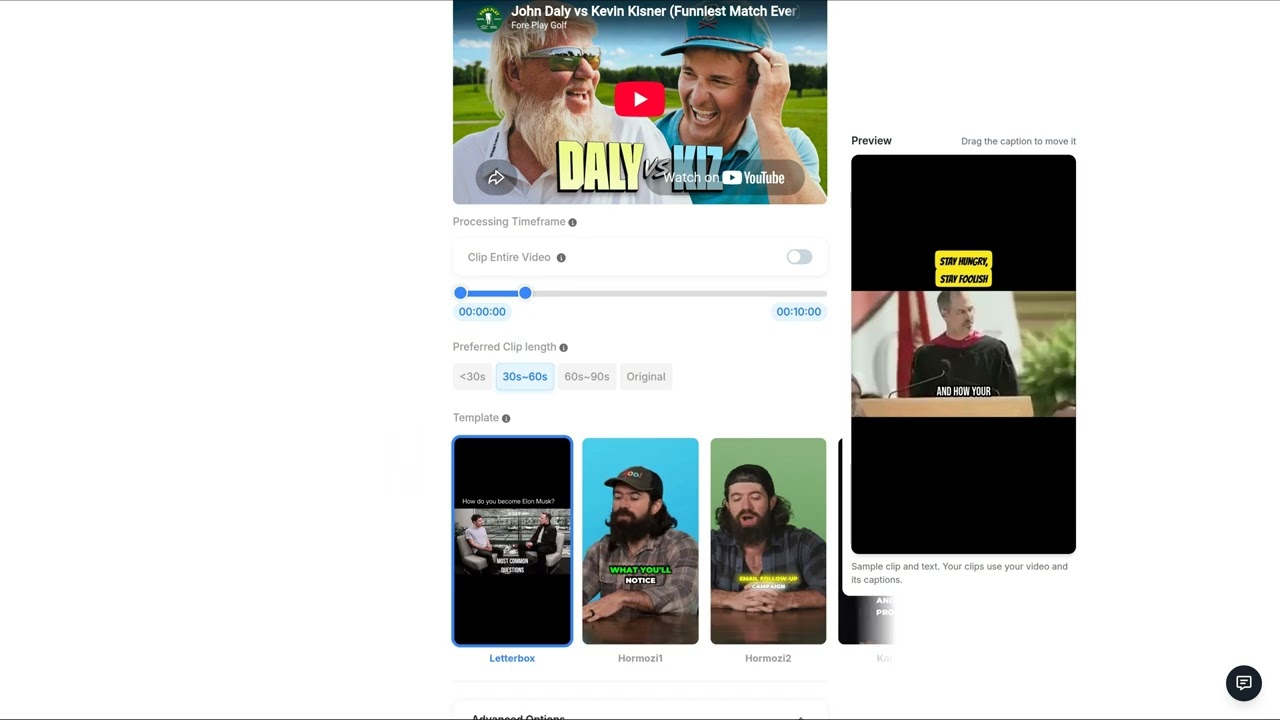
Ssemble is an AI clip maker used by 3.4M+ creators. When you paste a YouTube, Kick, Twitch (VOD) or Vimeo link or upload a file, it finds the most engaging moments automatically and cuts them into vertical 9:16 clips.
- Ranked by viral score. Each 20-minute part can return up to 11 clips (Auto allows up to 12), chosen as the top clips by viral score.
- Video type changes the logic. The Sports type changes how moments are picked and framed; the Game type builds a face cam plus gameplay split screen.
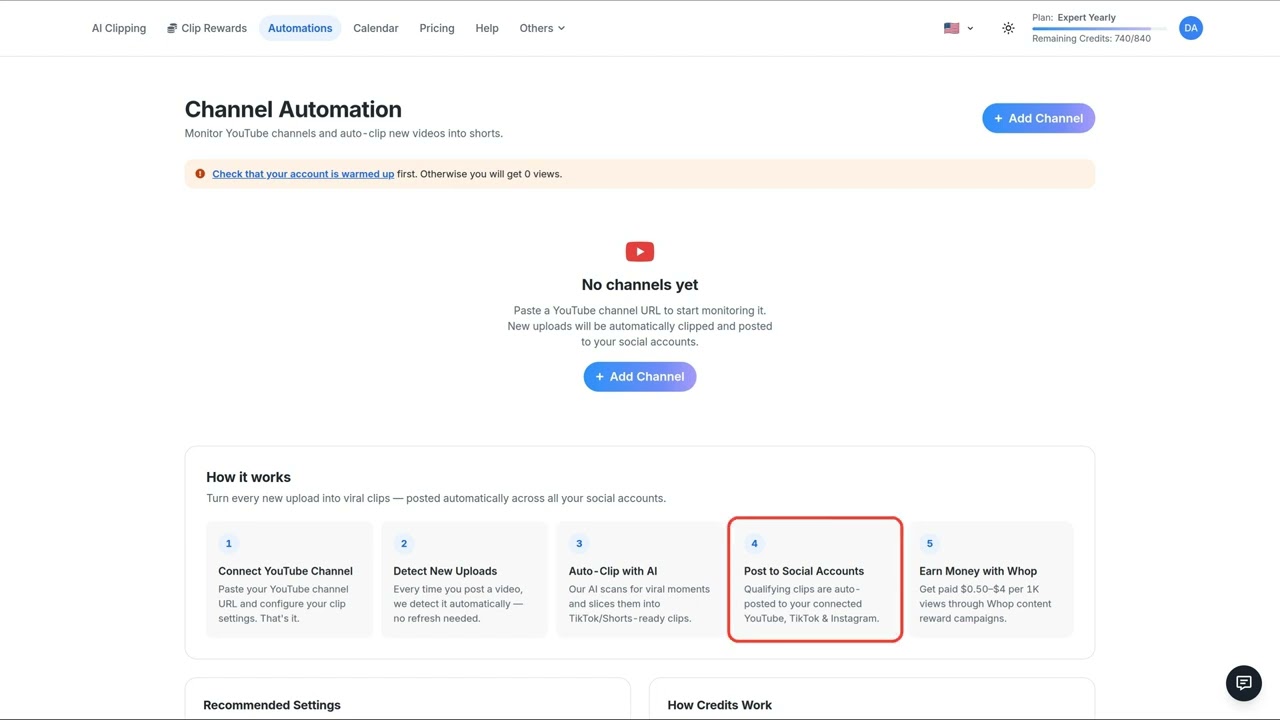
- Virality Threshold (0–100). In Channel Automation, you set the minimum score a clip needs before it is posted automatically. Raise it to post fewer, stronger clips; lower it to post more.
- Audience signals on long streams. When Channel Automation handles a stream longer than 5 hours, it clips the best 2-hour window, chosen from comments, captions, YouTube's "Most replayed" data and chat.
- You choose the timeframe. For long sources you can pick which part to process, which helps when you already know roughly where the good part is.
What Ssemble does not do: there is no prompt-based moment search. You cannot ask it to "find every time we talk about pricing". If that is your main need, look for a tool built around prompt search.
How other tools compare
| Ssemble | OpusClip | Vizard | Klap | Submagic | |
|---|---|---|---|---|---|
| Shows a virality score | Yes (viral score, Virality Threshold 0–100 in Channel Automation) | Yes, known for its virality score | — | — | — |
| Content-type modes | Default, Sports, Game | — | — | — | — |
| Prompt-based moment search | No | — | — | — | — |
| Lowest paid | $15/mo or $6/mo yearly | Starter $15 (monthly only) | $29 or $14.50 yearly | $29 or $14.50 yearly | $19 or $12 yearly |
| Free option to test | None | 60 credits, watermark | 60 credits, watermark, 720p | 1 trial video | None (trial) |
A dash means the detail is not on the pricing pages we used. Check each tool's current feature list before buying.
How to judge accuracy yourself
Because no benchmark exists, run your own. It takes about an hour:
- Pick a video where you know the answer. Use one of your own long videos where YouTube's "Most replayed" graph, comments or past clips already show which moments people loved.
- Write down the 5 best moments with timestamps before running any tool.
- Run the same video through each tool with similar settings (same clip length range).
- Count the hits. How many of your 5 moments appear in each tool's top 10? This is your "recall".
- Count the misses. How many of the top 10 clips would you never post? This is wasted output.
- Post the top 3 from each tool on the same account at similar times and compare average watch time and views after a few days.
- Repeat on two or three videos of different types (podcast, stream, interview). One video is not enough to conclude anything.
Use free tiers where they exist (OpusClip and Vizard both offer 60 credits) and one month of Ssemble Pro ($15) for the paid test.
Cost of running the test
| Tool | Cost to test three 60-minute videos |
|---|---|
| Ssemble Pro (monthly) | $15, uses 9 of 30 credits (3 per video) |
| OpusClip free | $0, but 60 credits cover 60 minutes, so one video only, with a watermark |
| Vizard free | $0, 60 credits, 720p, watermark |
| Klap | 1 trial video, then $29/mo or $14.50/mo yearly |
After testing, Ssemble's cost per 60-minute video is about $0.60 on Pro yearly ($6/month for 30 credits). Full plans are on the pricing page.
How to get the best moments out of Ssemble
- Sign up at ssemble.com and choose a plan.
- Paste your link or upload your file.
- If you know where the good part is, set the processing timeframe to that section.
- Pick the right video type: default for talking content, Sports for action, Game for gameplay with a face cam.
- Pick a preferred clip length (under 30s, 30–60s, 60–90s). Moments that need context often work better at 30–60s.
- Generate and review clips in viral-score order. Delete the ones you would not post.
- For ongoing channels, set up Channel Automation and adjust the Virality Threshold after a few weeks of results.
When to pick something else
- You need to search for a specific topic by typing a prompt: Ssemble does not support prompt-based moment search.
- You want to test for free first: OpusClip or Vizard offer free credits with a watermark.
- You want the most caption languages: Submagic (118) or Klap (99+).
- You need AI avatars or AI dubbing: Ssemble does not offer these.
Frequently Asked Questions
What is the most accurate AI for finding viral moments in a video?
No public, independent benchmark measures this, so no tool can prove it is the most accurate. Ssemble is a strong choice because it ranks clips by viral score, offers Sports and Game modes, and lets Channel Automation post only clips above a Virality Threshold you set. OpusClip is also known for its virality score.
Are AI virality scores reliable?
A virality score is each tool's own prediction, useful for ranking clips within that tool. Scores from different tools are not comparable, and a high score does not guarantee views, because audience, timing and platform also matter.
What is Ssemble's Virality Threshold?
It is a setting in Ssemble's Channel Automation, from 0 to 100. Only clips with a viral score above the threshold are posted automatically. A higher threshold posts fewer, stronger clips.
Can Ssemble find a specific topic if I describe it?
No. Ssemble has no prompt-based moment search. You can choose which part of the video to process and the video type, and it then picks moments automatically.
How do I test which AI clipper picks better moments?
Use a video where you already know the best moments, list them with timestamps, run the same video through each tool, and count how many of your moments appear in each tool's top 10. Then post the top clips and compare watch time over a few days.
Clips ranked by viral score
AI moment finding, face tracking, captions and auto-posting. From $6/mo billed yearly, no watermark.
Try Ssemble →
📚 Related Guides
Prices checked November 24, 2026 on each tool's official pricing page. Pricing and features may change.
Ready to Start Clipping?
Transform long videos into engaging short-form clips with Ssemble's AI-powered tools.
Get Started
