
AI Tool That Finds the Best Moments in a Video (2026)

Eric Lee
CEO and Founder of Ssemble
If you want to type a prompt like "find the part where they talk about pricing" and get clips back, OpusClip's ClipAnything is the best-known AI tool for prompt-based clipping in 2026. If you want the AI to find the best moments on its own and turn them into captioned vertical Shorts at a low per-video price, Ssemble is the better pick: it detects the most engaging moments automatically and lets you narrow the search by timeframe and video type, but it has no typed prompt. Vizard and Klap also find highlights automatically and are worth a look if you want a free tier or trial first.
TL;DR: Know the exact topic you want? Use a prompt-based tool such as OpusClip ClipAnything. Want the most engaging moments found for you, cut, captioned, reframed and scheduled? Use Ssemble (from $6/month billed yearly, about $0.60 per 60-minute video). Ssemble has no prompt search and no free plan; it does let you pick the processing timeframe and the video type (talking, Sports, Game).
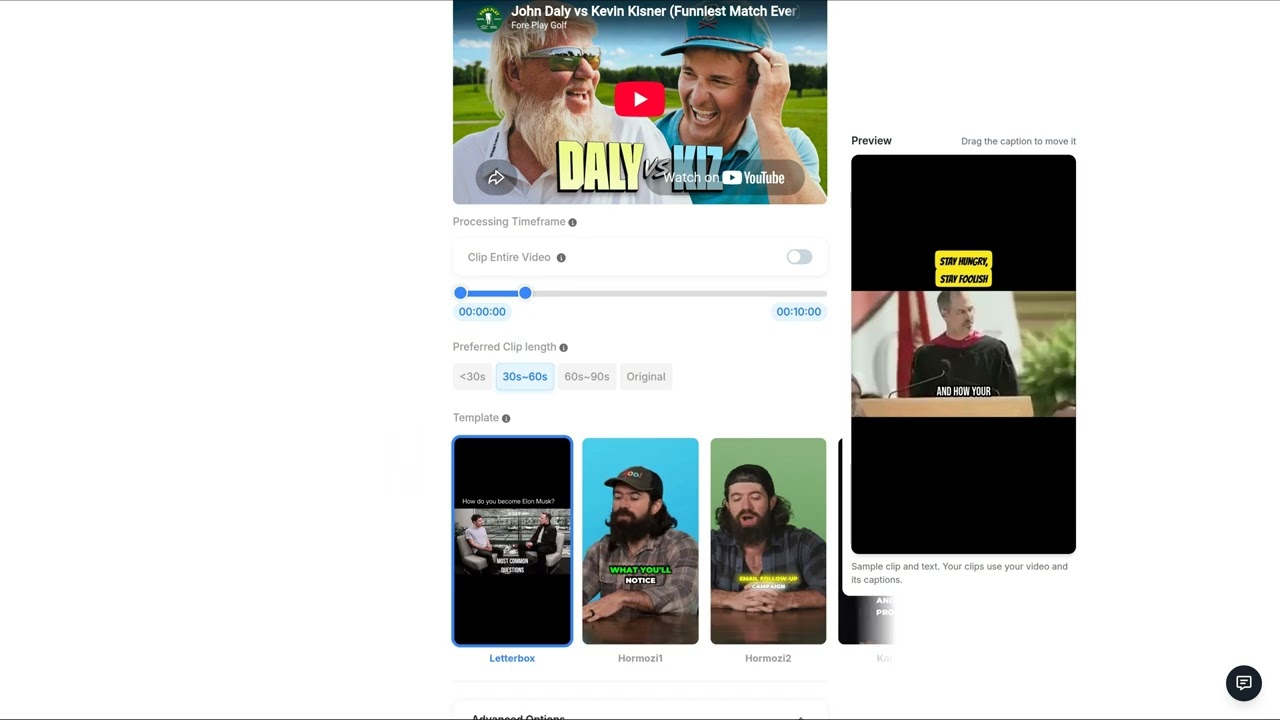
Two ways AI finds "the best moments"
There are two different jobs hiding behind this question, and the right tool depends on which one you have.
1. Prompt-based search: "find the part about X." You already know what you want: a specific topic, a guest's answer, a product mention. You type it, and the tool returns clips that match. OpusClip's ClipAnything is the feature most people mean when they ask for this.
2. Automatic highlight detection: "find what will perform." You do not know which parts are best; you want the AI to scan the whole video and pull out the moments most likely to hold attention as Shorts, Reels or TikToks. This is what Ssemble, Vizard and Klap are built around.
Most creators and clippers who post every day are doing job 2. Editors pulling a specific quote for a client are often doing job 1.
Comparison: AI tools that find the best moments in a video
| Tool | Typed prompt search | Automatic best-moment detection | Ways to narrow the search | Lowest paid plan | Free option |
|---|---|---|---|---|---|
| Ssemble | ❌ | ✅ | Processing timeframe; video type (talking, Sports, Game); clip length | $15/mo or $6/mo yearly | ❌ No free plan |
| OpusClip | ✅ ClipAnything | ✅ | Prompt | Starter $15/mo (monthly only) | ✅ 60 credits, watermark |
| Vizard | Not covered here | ✅ | Not covered here | Creator $29/mo or $14.50/mo yearly | ✅ 60 credits, watermark |
| Klap | Not covered here | ✅ | Not covered here | Basic $29/mo or $14.50/mo yearly | 1 trial video |
| Descript | Known for text-based editing | Not covered here | Find and cut by editing the transcript | $24/mo or $16/mo yearly | ✅ 60 min, 720p |
Prices checked November 24, 2026, on each tool's official pricing page.
How Ssemble finds moments without a prompt
Ssemble does not ask you what to look for. Instead it gives you three controls that shape where and how the AI searches:
- Processing timeframe. For long URL sources (YouTube, Kick, Twitch VOD, Vimeo) you can choose which part of the video to process. If you know the good segment of a 4-hour stream is in the second hour, point it there. For long uploaded files, you pick the part to upload.
- Video type. The default type is for talking content. Sports changes how moments are picked and framed. Game uses a split screen with the face cam on top and gameplay below.
- Preferred clip length. Under 30s, 30–60s or 60–90s, so the AI picks moments that work at that length.
After that, the AI finds the most engaging moments, cuts them into 9:16 clips with face tracking, adds animated captions, and you can edit or schedule them.
The honest trade-off: a timeframe narrows where the AI looks, not what it looks for. If you need "every time the guest mentions Bitcoin," Ssemble cannot do that directly; a prompt-based tool can.
How to find the best moments in a video with Ssemble
- Go to ssemble.com and pick a plan (from $6/month billed yearly).
- Paste a YouTube, Kick, Twitch VOD or Vimeo URL, or upload an MP4, MOV or WebM file.
- Set the processing timeframe if you only want part of a long video.
- Choose the video type (default, Sports or Game) and a preferred clip length.
- Pick a caption template and optional extras such as hook title, B-roll, sound effects or zoom.
- Review the clips the AI found. Trim, reframe or edit captions word by word in the editor.
- Download, or schedule and auto-post to TikTok, YouTube Shorts, Instagram Reels and X.
Cost example: finding moments in a 2-hour stream every week
Say you process one 2-hour (120-minute) video per week, four per month:
| Tool and plan | How usage is counted | One 120-min video | Four per month |
|---|---|---|---|
| Ssemble Pro (yearly, $6/mo) | 1 credit = 1 video up to 20 min | 6 credits | 24 of 30 credits |
| OpusClip Pro (yearly, $14.50/mo) | 1 credit = 1 minute | 120 credits | 480 credits, more than the 300 included |
| Vizard Creator (yearly, $14.50/mo) | 600 credits per month | 120 credits | 480 of 600 credits |
If you only need one part of each stream, Ssemble's timeframe setting means you process (and pay for) less. See all plans on the pricing page.
When to pick something else
- You need to search by topic or quote. Use a prompt-based tool such as OpusClip ClipAnything. Ssemble has no prompt search.
- You want to try before paying. Ssemble has no free plan. OpusClip and Vizard offer 60 free credits a month (watermarked); Klap offers one trial video.
- You edit mostly by transcript. Descript lets you find and cut sections by editing text, which suits long-form editing more than Shorts volume.
- You only need one clip. If you already know the timestamp, a manual cut in CapCut may be faster than any AI pass.
Which approach fits you?
| Your situation | Better fit |
|---|---|
| Daily Shorts from podcasts, streams or YouTube uploads | Ssemble (automatic moments, captions, scheduling) |
| Client wants "the part where the CEO talks about the roadmap" | OpusClip ClipAnything (prompt) |
| Gaming streams with a face cam | Ssemble Game mode |
| New YouTube uploads should become Shorts without manual work | Ssemble Channel Automation |
| Testing AI clipping with no budget | OpusClip or Vizard free tier |
FAQ
Which AI tool finds the best moments in a video by prompt?
OpusClip's ClipAnything is the best-known prompt-based option: you describe the moment and it returns matching clips. Ssemble does not support typed prompts; it finds the most engaging moments automatically and lets you set the timeframe and video type.
Can Ssemble find a specific topic in my video?
Not by prompt. Ssemble picks the most engaging moments automatically. You can limit processing to a chosen timeframe of a long URL source, which helps if you know roughly where the topic is.
What is the cheapest AI tool to find highlights in long videos?
Among paid plans checked November 24, 2026, Ssemble Pro billed yearly ($6/month) costs about $0.60 per 60-minute video, because 1 credit covers a video up to 20 minutes. Per-minute tools such as OpusClip cost about $2.90 for the same hour on Pro yearly.
Does AI highlight detection work for gaming and sports?
In Ssemble, yes: choose the Game video type for a face cam plus gameplay split screen, or Sports, which changes how moments are picked and framed for sports footage.
Is there a free AI tool that finds the best moments in a video?
Ssemble has no free plan. OpusClip and Vizard each include 60 free credits per month with a watermark, and Klap offers one trial video, which is enough to test on your own footage.
Let the AI find the moments: Try Ssemble — paste a URL, set the timeframe and video type, and get captioned vertical clips. Plans from $6/month billed yearly; see pricing.
📚 Related Guides
Disclaimer: Ssemble is our product. Prices checked November 24, 2026, on each tool's official pricing page. Always verify on each tool's website before buying.
Ready to Start Clipping?
Transform long videos into engaging short-form clips with Ssemble's AI-powered tools.
Get Started
