
Best Munch Alternative for Turning Videos Into Clips (2026)

Eric Lee
CEO and Founder of Ssemble
The best Munch alternative for turning videos into clips in 2026 is Ssemble: it starts at $6/month billed yearly versus Munch's $38/month yearly ($68 monthly), its Business plan covers about 50 hours of source video for $24/month yearly, and it auto-posts to TikTok, YouTube Shorts, Instagram Reels and X. It also adds Game and Sports modes, caption translation into 50+ languages and Channel Automation for YouTube channels. If you want a free plan to test, OpusClip and Vizard each give 60 free credits (watermarked), and Klap is a simple option that auto-posts on every plan. Like Munch, Ssemble has no free plan.
TL;DR: Munch starts at $68/mo ($38/mo yearly) for 500 minutes, about 8 hours of source video, with a 7-day trial and auto-posting on all plans. Ssemble Pro is $6/mo yearly for 30 credits (1 credit = 1 source video up to 20 minutes, so about 10 hours). Expert ($12/mo yearly) covers about 23 hours and Business ($24/mo yearly) about 50. Trade-offs: Ssemble has no free plan or trial and no prompt-based moment search.
Why people look for a Munch alternative
Munch is a repurposing tool aimed at marketers and teams. It auto-posts on all plans and offers a 7-day trial. The common reasons people compare alternatives:
- Entry price. At $68/month or $38/month billed yearly, Munch is one of the more expensive AI clippers.
- Minutes run out. 500 minutes is about eight one-hour videos a month. Weekly podcasters with two or three episodes a week can exceed it.
- No free plan. After the trial you pay, which is fine if the tool is a clear fit, but many people want to compare first.
- Format needs. Gaming streams need a split screen, and sports footage needs different framing.
Munch alternatives compared (November 2026)
| Ssemble | Munch | OpusClip | Vizard | Klap | |
|---|---|---|---|---|---|
| Lowest paid | $15/mo or $6/mo yearly | $68/mo or $38/mo yearly | Starter $15/mo (monthly only) | $29/mo or $14.50/mo yearly | $29/mo or $14.50/mo yearly |
| Included | 30 credits, 1 = 1 video up to 20 min | 500 minutes | 150 credits, 1 = 1 min | 600 credits | 100 output clips |
| Free option | None | None (7-day trial) | 60 credits, watermark | 60 credits, watermark, 720p | 1 trial video |
| Auto-post | TikTok, Shorts, Reels, X | All plans | From Starter | 1 account free, scheduling on Creator | All plans |
| API | From Pro, plus MCP server | Not stated | Limited on Pro, full on Business | All tiers (rate-limited) | Pay-as-you-go ($0.44/input video) |
| Caption languages | 50+ | Not stated | 20+ | Not stated | 99+ |
1. Ssemble: best Munch alternative on price and volume
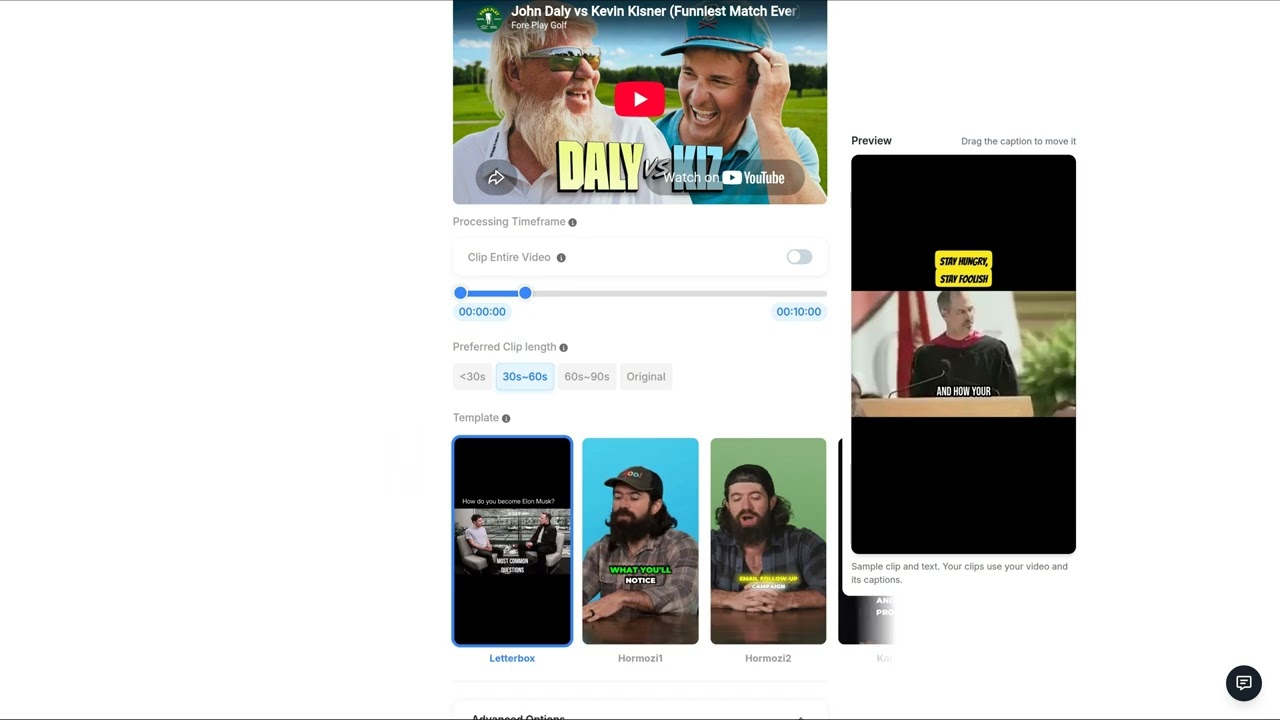
Ssemble is an AI clip maker used by 3.4M+ creators. You paste a link or upload a file, and the AI finds the most engaging moments and cuts them into vertical 9:16 clips with face and active-speaker tracking.
What you get:
- Inputs: YouTube, Kick, Twitch (VOD) and Vimeo links, or MP4, MOV and WebM uploads. Long sources are supported: YouTube, Kick and Twitch links up to 48 hours, where you pick a part of up to 5 hours to process.
- Clip lengths: under 30s, 30–60s, 60–90s, or Original (captions only, for inputs up to 5 minutes).
- Video types: default (talking), Sports and Game (face cam on top, gameplay below).
- Captions: animated templates (Letterbox, Hormozi-style and more), words-per-caption and position settings, translation into 50+ languages with the original audio kept.
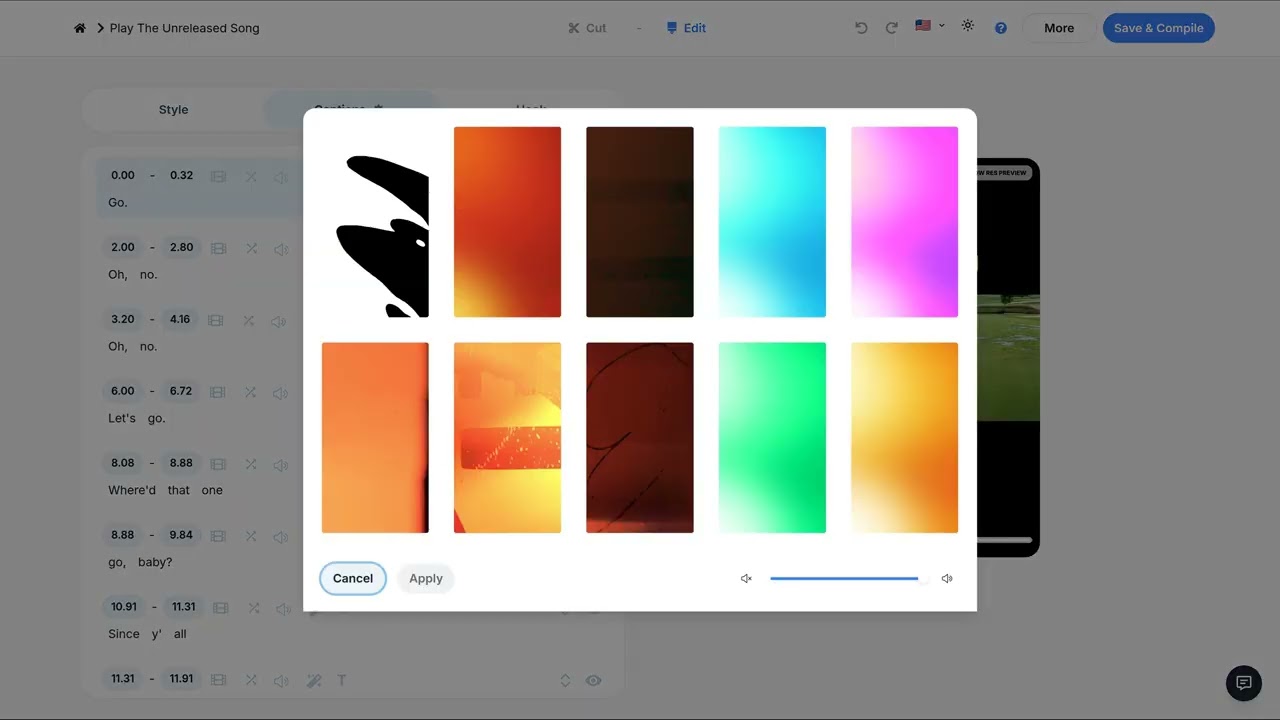
- Extras: B-roll, transitions, sound effects, zoom, hook title, CTA overlay, background music, logo overlay, looping "game video" footage, end screen.
- Editor: word-by-word caption editing, trim, re-crop, color filters.
- Publishing: schedule and auto-post to TikTok, YouTube Shorts, Instagram Reels and X from a calendar.
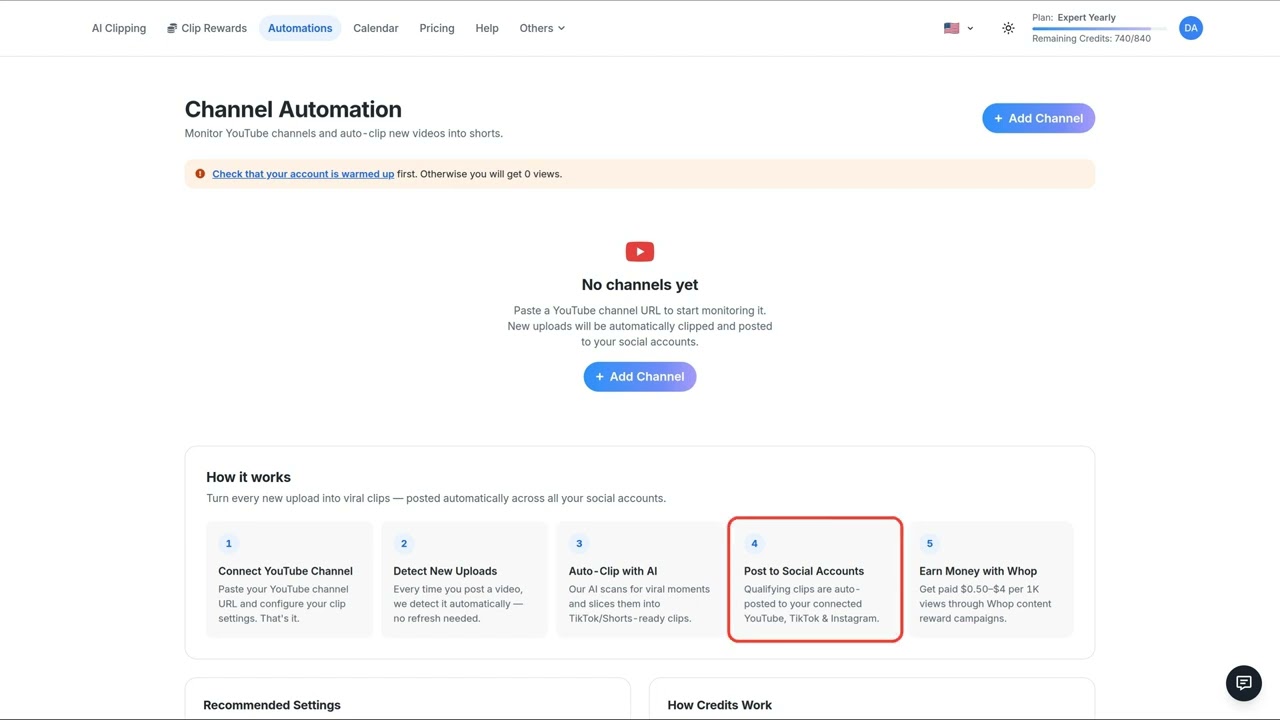
- Channel Automation (paid plans): every new upload on a YouTube channel is clipped and posted on a schedule, up to 21 clips per week per automation.
Honest trade-offs vs Munch:
- Munch has a 7-day trial; Ssemble has no free plan or trial.
- Ssemble has no prompt-based moment search; you set the processing timeframe and video type instead.
- Ssemble does not advertise team workspaces or brand kits, so teams that rely on those should check whether Munch covers their workflow better.
2. OpusClip: free plan and a well-known name
OpusClip gives 60 free credits with a watermark and 3-day exports. Starter is $15/month (monthly only) for 150 credits, and Pro is $29/month or $14.50/month yearly for 300 credits, where 1 credit is one minute. It supports 20+ caption languages. See the OpusClip pricing breakdown.
3. Vizard: free testing and an API on all tiers
Vizard's free plan gives 60 credits at 720p with a watermark. Creator is $29/month or $14.50/month yearly for 600 credits, with scheduling. Its API is available on every tier with rate limits. Our Vizard alternatives guide compares it in detail.
4. Klap: one-click simplicity
Klap Basic is $29/month or $14.50/month yearly for 100 output clips. It auto-posts on all plans, supports 99+ caption languages and has a pay-as-you-go API at $0.44 per input video.
5. Submagic: caption-heavy edits
Submagic supports 118 caption languages. Starter is $19/month or $12/month yearly for 45 credits (about 5 long videos), with a trial instead of a free plan.
Cost example: 12 one-hour podcast episodes a month
| Plan | Monthly price | Covers 12 hours of source video? |
|---|---|---|
| Ssemble Expert (yearly) | $12 | Yes: 36 of 70 credits (12 × 3) |
| Ssemble Pro (yearly) | $6 | No: 30 credits covers 10 hours |
| Ssemble Business (yearly) | $24 | Yes: 36 of 150 credits |
| Munch (yearly) | $38 | No: 500 minutes covers about 8.3 hours |
| OpusClip Pro (yearly) | $14.50 | No: 300 minutes covers 5 hours |
For 12 hours a month, Ssemble Expert at $12/month yearly covers the volume with room to spare, while Munch's entry plan would run short. Full plan details are on the pricing page.
How to turn a long video into clips in Ssemble
- Sign up at ssemble.com and pick Pro, Expert or Business.
- Connect TikTok, YouTube or Instagram (Pro 1 account, Expert 3, Business unlimited).
- Paste a YouTube, Kick, Twitch or Vimeo link, or upload an MP4, MOV or WebM file.
- For long videos, choose "Clip Entire Video" (split into 20-minute parts, 1 credit each) or pick a single 20-minute part for 1 credit.
- Choose the video type and clip length, then a caption template, language and extras.
- Generate. Each 20-minute part returns up to 11 clips ranked by viral score.
- Edit captions or trims, then schedule the clips or set up Channel Automation for future uploads.
When to stay with Munch or pick something else
- You want a trial before paying: Munch's 7-day trial, or free credits from OpusClip and Vizard.
- You need team workspaces or brand kits: check Munch and other team-focused tools; Ssemble does not advertise these.
- You need more caption languages: Submagic (118) or Klap (99+).
- You need prompt-based search, AI avatars or AI dubbing: Ssemble does not offer these.
Frequently Asked Questions
What is the best Munch alternative?
Ssemble is the best Munch alternative for turning long videos into clips on a budget. It starts at $6/month billed yearly versus Munch's $38/month yearly, charges 1 credit per source video up to 20 minutes, and auto-posts to TikTok, YouTube Shorts, Instagram Reels and X. It has no free plan.
How much cheaper is Ssemble than Munch?
Munch starts at $68/month or $38/month billed yearly for 500 minutes. Ssemble Pro is $15/month or $6/month yearly for 30 credits, about 10 hours of source video. Ssemble Business is $24/month yearly for 150 credits, about 50 hours.
Is there a free Munch alternative?
OpusClip and Vizard each offer 60 free credits with a watermark, and Descript gives 60 free minutes at 720p. Ssemble and Munch have no free plan; Munch has a 7-day trial.
Can Ssemble auto-post clips like Munch?
Yes. Ssemble schedules and auto-posts to TikTok, YouTube Shorts, Instagram Reels and X. Pro includes 1 social account, Expert 3, and Business unlimited. Channel Automation can also clip and post every new YouTube upload on a schedule.
How does Ssemble charge for a two-hour video?
Ssemble charges 1 credit per 20-minute part. Clipping a full two-hour video uses 6 credits, or you can pick a single 20-minute part for 1 credit.
More hours of video for less
AI clipping, 50+ caption languages and auto-posting from $6/mo billed yearly. No watermark.
Try Ssemble →
📚 Related Guides
Prices checked November 24, 2026 on each tool's official pricing page. Pricing and features may change.
Ready to Start Clipping?
Transform long videos into engaging short-form clips with Ssemble's AI-powered tools.
Get Started
