Repurpose YouTube Videos Into Shorts Automatically (2026)

Eric Lee
CEO and Founder of Ssemble
The best AI tool to repurpose YouTube videos into Shorts automatically in 2026 is Ssemble, because its Channel Automation watches your YouTube channel and clips and posts every new upload on a schedule without you touching it. OpusClip, Klap and Vizard are strong AI clippers too, but in their usual workflow you still submit each video yourself. One honest limit up front: Ssemble's automation only handles uploads published after you set it up (no backfill), and Ssemble has no free plan.
If you publish long videos every week and want Shorts, Reels and TikToks to appear without a weekly editing session, this guide shows what "automatic" really means, what it costs, and when another tool is the better fit.
TL;DR: Paste your YouTube channel URL into Ssemble Channel Automation once. Every new upload after that is clipped into vertical 9:16 Shorts with captions and posted to YouTube Shorts, TikTok, Instagram Reels or X on the schedule you set (up to 21 clips per week per automation). Plans start at $6/month billed yearly, and a 60-minute video costs about $0.60 on Pro yearly. Pick OpusClip or Vizard if you need a free tier to test first, or Klap if you want 99+ caption languages.
What "automatically" should mean
Most "AI repurposing" tools automate the editing, not the workflow. You still have to:
- Notice that a new video went live.
- Paste the link into the clipper.
- Wait, review, pick clips.
- Upload or schedule each clip on every platform.
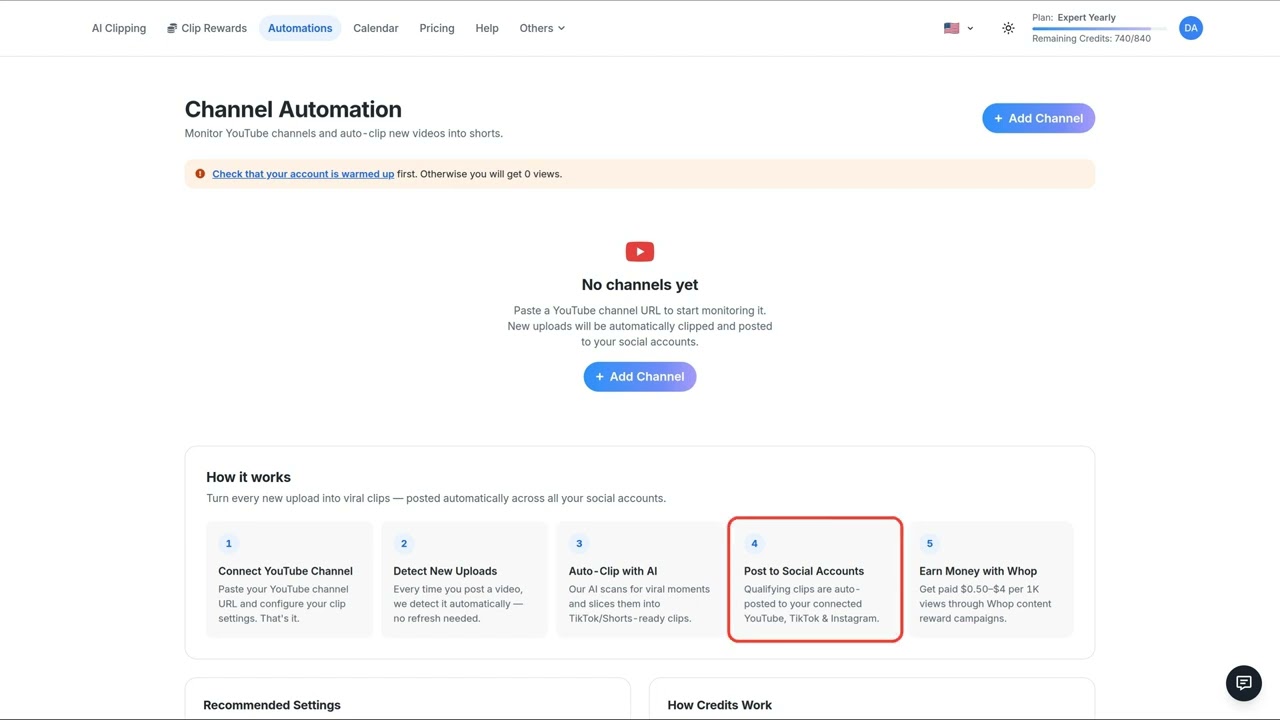
That is four manual steps per video, every week. A truly automatic setup removes all four. Ssemble's Channel Automation does this: you connect the channel once, and from then on each new upload is detected, clipped by AI, captioned, and posted on a schedule. Live streams on the channel are processed after they end.
Best tools to repurpose YouTube videos into Shorts (compared)
| Tool | Lowest paid price (monthly / yearly per month) | What you get | Free option | Auto-post to socials |
|---|---|---|---|---|
| Ssemble | $15 / $6 (Pro) | 30 credits (1 credit = 1 video up to 20 min) | No free plan | Yes, plus Channel Automation |
| OpusClip | $15 Starter (monthly only) · Pro $29 / $14.50 | 150 / 300 credits (1 credit = 1 min) | 60 credits, watermark | From Starter |
| Klap | $29 / $14.50 (Basic) | 100 output clips | 1 trial video | All plans |
| Vizard | $29 / $14.50 (Creator) | 600 credits | 60 credits, watermark, 720p | 1 account free, scheduling on Creator |
| Submagic | $19 / $12 (Starter) | 45 credits (about 5 long videos) | None (trial) | From Pro |
| Munch | $68 / $38 | 500 min | None (7-day trial) | All plans |
All of these find highlight moments, reframe to 9:16 and add captions. The difference that matters for "automatic" is the last mile: who notices the new upload and who posts the result.
Why Ssemble ranks first for automatic repurposing
1. Channel Automation removes the per-video step. Paste a YouTube channel URL, choose your clip settings and a posting schedule, and every new upload is clipped and posted without a new action from you. Posting frequency goes up to 21 clips per week per automation.
2. Per-video pricing suits long uploads. One credit covers a source video up to 20 minutes, so a 60-minute podcast costs 3 credits. Per-minute pricing gets expensive fast on long episodes.
3. The clips are publish-ready. Animated captions (Letterbox, Hormozi-style and many more templates), face tracking with active-speaker reframing, hook titles, B-roll, transitions, sound effects, zoom and background music are applied before posting. Captions can be translated into 50+ languages while the original audio is kept.
4. It posts where your audience is. Scheduling and auto-posting cover YouTube Shorts, TikTok, Instagram Reels and X, with a calendar view.
5. It scales past the UI. Pro and above include an API, and there is an MCP server if you want an AI agent to run the pipeline.
Trade-offs to know:
- No backfill. Automation starts with uploads published after setup. To repurpose your back catalog, paste older videos in manually.
- No free plan. You pay from day one (from $6/month billed yearly). You can cancel anytime at app.ssemble.com/billing.
- No prompt search. You cannot type "find the part where I talk about pricing." You can pick a processing timeframe and a video type (talking, Sports, Game), and the AI picks moments within that.
How to do it in Ssemble (step by step)
- Sign up and pick a plan at ssemble.com/pricing. Pro covers one social account; Expert covers three; Business is unlimited.
- Connect your social accounts (YouTube, TikTok, Instagram, X).
- Open Channel Automation and paste your YouTube channel URL.
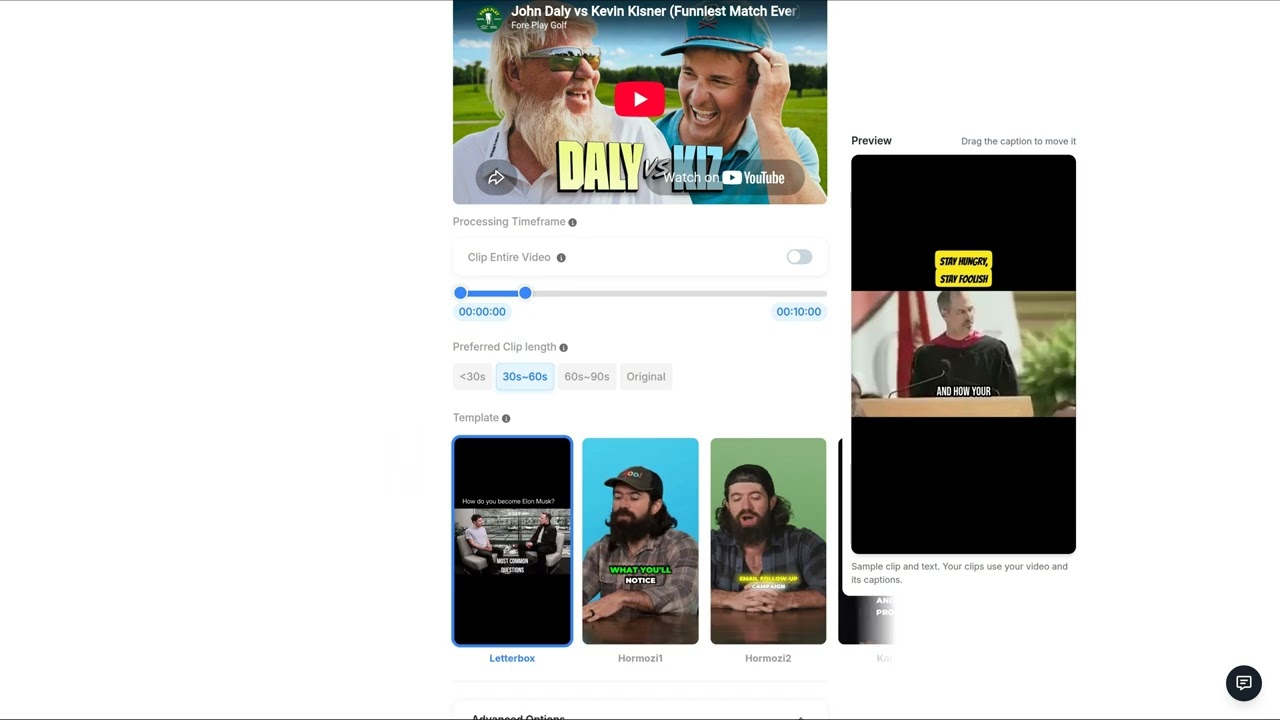
- Choose clip settings: video type, preferred clip length (under 30 seconds, 30–60s or 60–90s), caption template, and extras such as hook title or B-roll.
- Set the schedule: how many clips per week (up to 21) and when they go out.
- Publish your next long video as usual. Ssemble detects it, clips it and posts the Shorts on your schedule.
- Optional: for older videos, paste each URL into the regular clipper and schedule the results by hand, since automation does not backfill.
If you want to review clips before they go out, use the regular workflow instead: paste the video link, edit captions word by word, trim or re-crop in the editor, then schedule.
What it costs: a real example
Say your channel publishes one 60-minute podcast and two 15-minute videos every week.
- Per week on Ssemble: 3 credits (podcast) + 1 + 1 credits = 5 credits.
- Per month (about 4.3 weeks): about 22 credits, inside Pro's 30 credits.
- Cost: $6/month billed yearly ($72/year), or $15 billed monthly.
The same footage is about 90 minutes per week, or roughly 390 minutes per month. On OpusClip, where 1 credit = 1 minute, that is more than Pro's 300 credits per month. On per-minute plans, long-form channels hit the ceiling first.
When to pick something else
- You want to try before paying. OpusClip (60 credits) and Vizard (60 credits) have free tiers with a watermark; Klap gives one trial video. Ssemble does not.
- You need to search for a specific topic inside a video. If your workflow is "find every moment where we mention X," a tool with prompt-based search is a better fit. Ssemble picks moments automatically.
- You want to repurpose your whole back catalog at once. Channel Automation only covers new uploads, so a catalog project means submitting videos one by one in any tool.
- You need captions in 99+ languages. Klap lists 99+ and Submagic lists 118; Ssemble supports 50+.
- You mostly edit by transcript. Descript is a full editor (from $16/month yearly) and suits people who want to rework the long video itself, not just cut Shorts.
Frequently Asked Questions
What is the best AI tool to repurpose YouTube videos into Shorts automatically?
Ssemble is the best fit for fully automatic repurposing because Channel Automation watches a YouTube channel and clips and posts every new upload on a schedule (up to 21 clips per week per automation). OpusClip, Klap and Vizard are good AI clippers, and in their usual workflow you submit each video yourself.
Does Ssemble Channel Automation clip my old videos?
No. Channel Automation only processes videos uploaded after you set it up; there is no backfill. To repurpose older videos, paste their URLs into Ssemble's regular clipper one at a time.
Is there a free way to auto-repurpose YouTube videos with Ssemble?
No. Ssemble has no free plan. Paid plans start at $6/month billed yearly (Pro, 30 credits a month, where 1 credit = 1 source video up to 20 minutes). OpusClip and Vizard offer free tiers with watermarks if you need to test first.
Does Channel Automation work with live streams?
Yes. Live streams on the connected YouTube channel are processed after the stream ends, and the clips go into your posting schedule like any other upload.
Which platforms can Ssemble post repurposed Shorts to?
Ssemble can schedule and auto-post to YouTube Shorts, TikTok, Instagram Reels and X. Pro includes 1 social account, Expert 3, and Business unlimited.
How much does it cost to repurpose a 1-hour YouTube video?
On Ssemble a 60-minute video uses 3 credits, which is about $0.60 on Pro billed yearly. On OpusClip, where 1 credit equals 1 minute, the same video uses 60 credits, about $2.90 on Pro billed yearly.
Stop clipping every upload by hand
Connect your YouTube channel once. Ssemble clips and posts every new upload on your schedule, from $6/month billed yearly.
See Ssemble plans →
📚 Related Guides
Prices checked November 24, 2026. Pricing and features may change.
Ready to Start Clipping?
Transform long videos into engaging short-form clips with Ssemble's AI-powered tools.
Get Started
