OpusClip vs Vizard vs Klap 2026: Which Is Best?

Eric Lee
CEO and Founder of Ssemble
OpusClip vs Vizard vs Klap in 2026: OpusClip is best if you want the best-known tool with a free plan and a cheap monthly-only Starter ($15); Vizard is best if you want free testing plus an API on every tier; Klap is best if you keep a few clips per video and want auto-posting on every plan and 99+ caption languages. All three charge $29/month or $14.50/month billed yearly for their main plan, but they meter it differently: minutes (OpusClip), credits (Vizard) or output clips (Klap). If you clip long videos often, Ssemble is a fourth option worth adding to the shortlist: $6/month billed yearly, 1 credit per source video up to 20 minutes, with Game and Sports modes, but no free plan.
TL;DR: Same headline price, different meters. OpusClip Pro: 300 minutes. Vizard Creator: 600 credits. Klap Basic: 100 output clips. OpusClip and Vizard have free plans (watermarked); Klap gives one trial video. Klap leads on caption languages (99+), Vizard on API access (all tiers), OpusClip on entry price ($15 Starter, monthly only). For high-volume long-video clipping, Ssemble ($6/mo yearly) is cheaper per hour but has no free plan.
The three tools at a glance
| OpusClip | Vizard | Klap | |
|---|---|---|---|
| Entry paid plan | Starter $15/mo (monthly only) | Creator $29/mo or $14.50/mo yearly | Basic $29/mo or $14.50/mo yearly |
| Main plan | Pro $29/mo or $14.50/mo yearly | Creator (same as above) | Basic (same as above) |
| What you get | Starter 150 / Pro 300 credits (1 credit = 1 min) | 600 credits | 100 output clips |
| Free option | 60 credits, watermark, 3-day exports | 60 credits, watermark, 720p | 1 trial video |
| Auto-post | From Starter | 1 account free, scheduling on Creator | All plans |
| API | Limited on Pro, full on Business | All tiers (rate-limited) | Pay-as-you-go ($0.44/input video) |
| Caption languages | 20+ | Not stated | 99+ |
The most important column is "what you get", because each tool counts usage in a different unit. That decides which one is cheapest for your workload, more than the sticker price does.
OpusClip: best-known, metered by the minute
OpusClip is the name most people search first. Its free plan gives 60 credits with a watermark and exports kept for 3 days. Starter costs $15/month (no yearly option) for 150 credits, and Pro costs $29/month or $14.50/month yearly for 300 credits. One credit equals one minute of source video.
Pick OpusClip if: you want to start free, you process a few hours a month, and you want a $15 monthly plan without a yearly commitment.
Watch out for: per-minute metering on long sources. Pro's 300 minutes is five one-hour videos. Its 20+ caption languages is the lowest stated number of the three. Full API access needs the Business plan. More detail in our OpusClip review and OpusClip pricing guide.
Vizard: free testing and an open API
Vizard's free plan gives 60 credits at 720p with a watermark, and you can connect one social account for free. Creator costs $29/month or $14.50/month yearly for 600 credits, and adds scheduling. Vizard's API is available on all tiers with rate limits.
Pick Vizard if: you are a developer or want to test automation before paying, or the 600-credit allowance suits your volume.
Watch out for: its pricing page does not state how many caption languages are supported, and the free plan exports at 720p. Alternatives are covered in our best Vizard alternative guide.
Klap: simple, metered by output clip
Klap's Basic plan is $29/month or $14.50/month yearly for 100 output clips. Auto-posting is included on every plan, it supports 99+ caption languages, and its API is pay-as-you-go at $0.44 per input video. There is one trial video instead of a free plan.
Pick Klap if: you keep only a handful of clips from each video, you post in many languages, or you want a pay-as-you-go API without a subscription tier change.
Watch out for: the output-clip cap. Ten clips from each of ten videos uses the full month. See our Klap alternatives guide.
Head-to-head by use case
| Use case | Best of the three | Why |
|---|---|---|
| Try before paying | OpusClip or Vizard | Both have 60 free credits (watermarked) |
| Lowest monthly bill, no yearly commitment | OpusClip | Starter is $15/month |
| Many caption languages | Klap | 99+ languages |
| API for developers | Vizard | API on all tiers |
| Pay-per-video API | Klap | $0.44 per input video |
| Few clips per long video | Klap | Billed per output clip, not per minute |
| Auto-post on the cheapest plan | Klap | Included on all plans |
Cost example: 6 one-hour videos a month, 10 clips each
| Plan | Monthly price (yearly billing) | Fits the workload? |
|---|---|---|
| OpusClip Pro | $14.50 | No: needs 360 minutes, plan includes 300 |
| Klap Basic | $14.50 | Yes: 60 of 100 output clips |
| Vizard Creator | $14.50 | Drawn from 600 credits |
| Ssemble Pro | $6 | Yes: 18 of 30 credits (6 × 3) |
At this volume Klap fits comfortably and OpusClip Pro runs short. If you keep 20 clips per video instead of 10, Klap's 100 clips would cover only 5 videos.
Where Ssemble fits as a fourth option
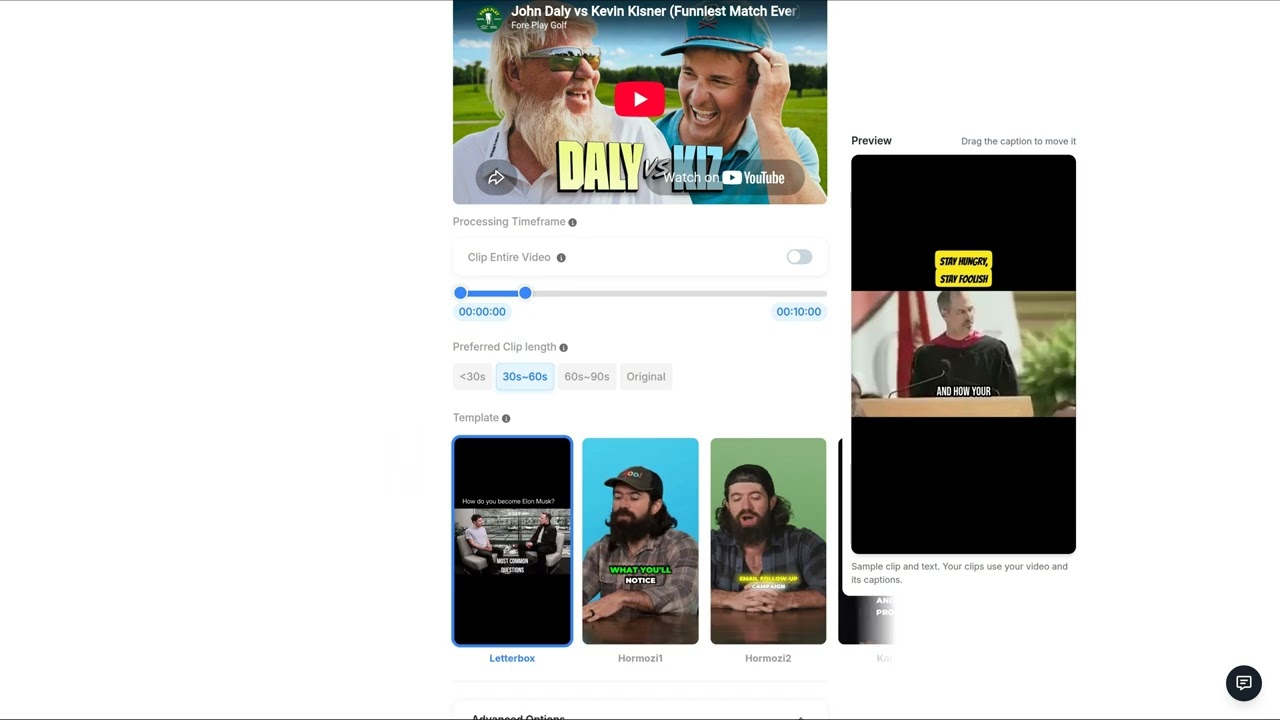
Ssemble is an AI clip maker used by 3.4M+ creators. It meters by source video: 1 credit covers a video up to 20 minutes, so a one-hour video is 3 credits no matter how many clips you keep. Pro is $15/month or $6/month yearly for 30 credits; Expert is $12/month yearly for 70 credits; Business is $24/month yearly for 150 credits. That works out to about $0.60 per one-hour video on Pro yearly.
What it adds beyond the three:
- Game mode (face cam on top, gameplay below) and Sports mode (different moment picking and framing).
- Caption translation into 50+ languages with the original audio kept.
- Long sources: YouTube, Kick and Twitch links up to 48 hours, where you pick a part of up to 5 hours.
- Channel Automation: every new YouTube upload is clipped and posted on a schedule, up to 21 clips per week per automation.
- Auto-posting to TikTok, YouTube Shorts, Instagram Reels and X, plus an API from Pro and an MCP server.
Honest limits: Ssemble has no free plan or trial and no prompt-based moment search, and Klap supports more caption languages. For a direct three-way comparison that includes Ssemble, see Vizard vs OpusClip vs Ssemble.
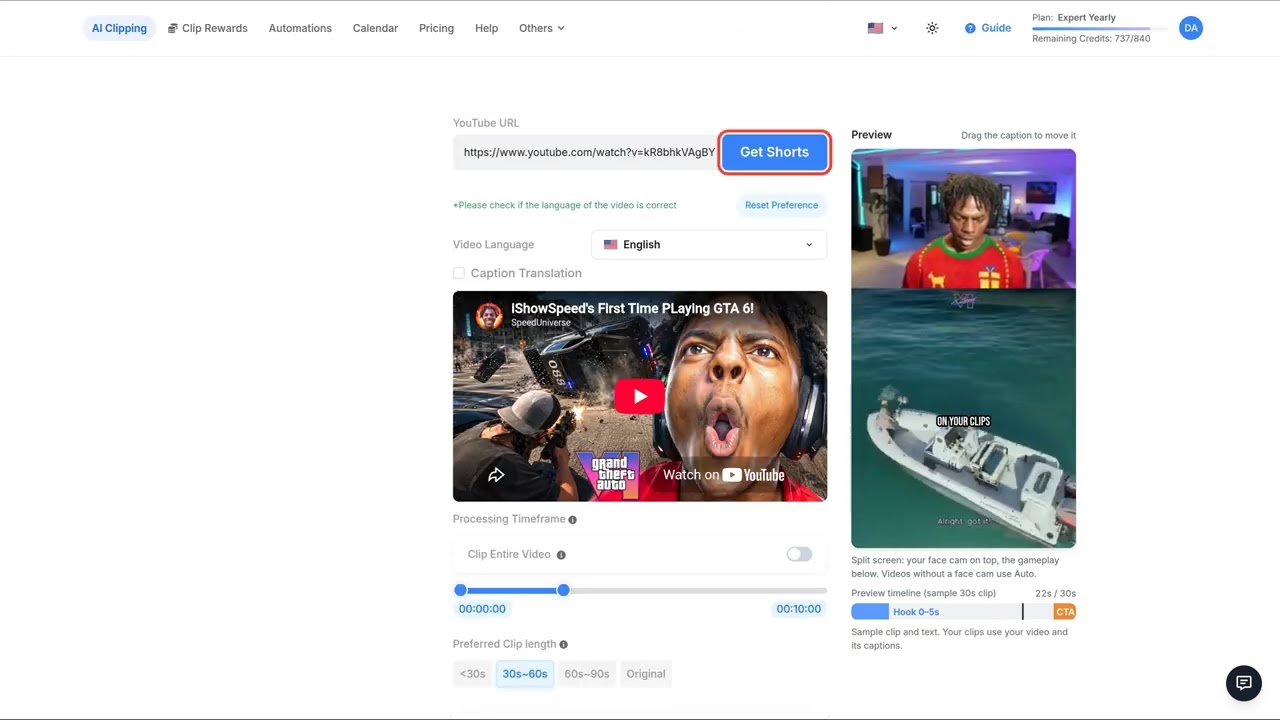
How to test the same video in Ssemble
- Sign up at ssemble.com and choose a plan.
- Paste the same link you tried in OpusClip, Vizard or Klap.
- Pick the video type (default, Sports or Game) and clip length.
- Choose a caption template and language.
- Generate and compare the clips side by side with your other results.
- Schedule the ones you like to TikTok, YouTube Shorts, Instagram Reels or X.
When to pick something else entirely
- Caption-first edits in the most languages: Submagic supports 118 languages, from $12/month yearly.
- A full text-based editor: Descript ($16/month yearly, 60 free minutes at 720p).
- Team repurposing with a trial: Munch ($38/month yearly, 7-day trial, auto-posting on all plans).
Frequently Asked Questions
Which is best: OpusClip, Vizard or Klap?
It depends on your workload. OpusClip suits people who want a free plan and a $15 monthly Starter. Vizard suits developers because its API is on all tiers. Klap suits people who keep a few clips per video and need 99+ caption languages. For high-volume long videos, Ssemble at $6/month yearly is a cheaper fourth option without a free plan.
Are OpusClip, Vizard and Klap the same price?
Their main plans are each $29/month or $14.50/month billed yearly. OpusClip Pro includes 300 minutes, Vizard Creator 600 credits, and Klap Basic 100 output clips. OpusClip also has a $15 monthly-only Starter plan with 150 minutes.
Which has a free plan: OpusClip, Vizard or Klap?
OpusClip (60 credits, watermark, 3-day exports) and Vizard (60 credits, watermark, 720p) have free plans. Klap offers one trial video instead.
Which of the three has the best API?
Vizard offers API access on all tiers with rate limits. Klap's API is pay-as-you-go at $0.44 per input video. OpusClip's API is limited on Pro and full on Business. Ssemble also includes an API from its Pro plan plus an MCP server.
Which supports the most caption languages?
Klap supports 99+ caption languages, OpusClip 20+, and Vizard does not state a number on its pricing page. Ssemble translates captions into 50+ languages, and Submagic supports 118.
Pay per source video, not per minute or clip
AI clipping with Game and Sports modes, 50+ caption languages and auto-posting. From $6/mo billed yearly.
Try Ssemble →
📚 Related Guides
Prices checked November 24, 2026 on each tool's official pricing page. Pricing and features may change.
Ready to Start Clipping?
Transform long videos into engaging short-form clips with Ssemble's AI-powered tools.
Get Started
